
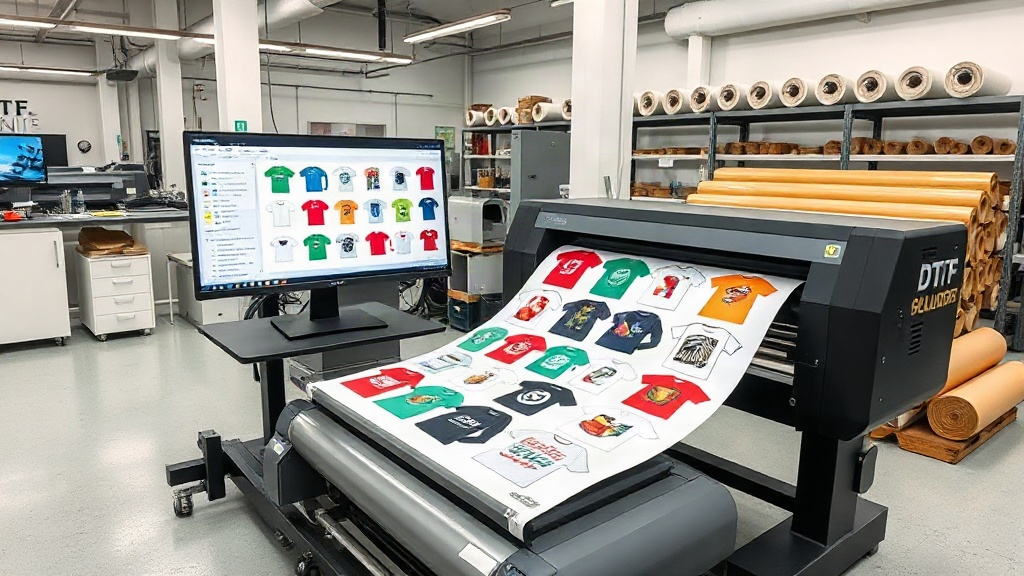
If you are in the custom apparel business, you have likely heard about DTF (Direct to Film) printing. This technology has revolutionized how we transfer designs onto fabrics, offering vibrant colors and exceptional durability. But as your order volume grows, manually arranging designs on a film can become a bottleneck. Enter the DTF gangsheet builder, a tool that can dramatically streamline your production. In this guide, we will explore what a gangsheet builder is, why it is essential, and how to use it effectively to save time and money.
What is a DTF Gangsheet Builder?
A DTF gangsheet builder is software or an online tool that helps you arrange multiple designs onto a single sheet of DTF film. Think of it as a digital puzzle solver for your printing needs. Instead of printing each design separately, you combine them into one large sheet, maximizing the use of expensive film and ink. This process, known as nesting or ganging, is a game-changer for efficiency.
Why Use a Gangsheet Builder?
The primary reason is cost savings. DTF film and ink are not cheap, and wasting them on empty spaces is like throwing money away. By grouping designs, you use less film per print, reducing your overhead. Additionally, printing one large sheet is faster than multiple small ones, increasing your throughput. For businesses that handle many small orders, this efficiency is crucial.
Key Features to Look for in a DTF Gangsheet Builder
Not all gangsheet builders are created equal. Here are the features that matter most:
- Drag-and-drop interface: Makes arranging designs intuitive and quick.
- Automatic nesting: Optimizes placement to minimize waste.
- Rotation and scaling: Allows you to fit designs into tight spaces.
- Support for various file formats: Should handle PNG, JPG, PDF, and more.
- Integration with printers: Direct printing from the software saves steps.
- Template saving: Reuse common layouts for recurring orders.
When choosing a builder, consider your specific needs. If you print a lot of t-shirts, you might want a builder that can handle large sheets. If you do small batches, a simpler tool might suffice.
How to Use a DTF Gangsheet Builder: Step-by-Step
Using a gangsheet builder is straightforward. Here is a typical workflow:
- Import your designs: Upload all the images you want to print. Ensure they are high resolution and have transparent backgrounds.
- Set your sheet size: Choose the dimensions of your film roll. Common widths are 13, 17, 22, and 24 inches.
- Arrange your designs: Drag and drop each design onto the canvas. Use rotation and scaling to fit them tightly.
- Optimize: Use the auto-nesting feature if available, or manually adjust to fill gaps.
- Print: Once satisfied, send the sheet to your DTF printer.
Pro tip: Leave a small margin between designs to avoid color bleeding and to make cutting easier.
Benefits of Using a DTF Gangsheet Builder
Adopting a gangsheet builder can transform your business. Here are the main benefits:
- Cost reduction: Less film and ink waste means lower production costs.
- Time savings: Faster setup and printing mean you can take on more orders.
- Increased profits: By reducing waste and increasing efficiency, your profit margin improves.
- Consistency: Digital arrangement ensures every sheet is optimized the same way.
- Scalability: Easily handle larger volumes without hiring more staff.
For a small business, these benefits can be the difference between staying afloat and thriving.
Common Mistakes to Avoid
Even with a good builder, some pitfalls can undermine your efficiency:
- Overcrowding: Packing designs too tightly can cause cutting errors and color bleeding.
- Forgetting mirrors: DTF transfers need to be mirrored before printing. Most builders have a mirror option, but double-check.
- Ignoring resolution: Low-res images will look poor when printed. Always use high-quality files.
- Not updating software: New features and bug fixes can improve performance.
- Using the wrong film: Ensure your film is compatible with your printer and ink.
Avoid these mistakes by staying informed and testing your layouts before full production.
Choosing the Right DTF Gangsheet Builder for Your Business
With many options available, how do you choose? Start by assessing your volume and budget. Free tools like those from DTF printer manufacturers often suffice for beginners. As you grow, consider paid software with advanced features. Look for user reviews and try demos. The right DTF gangsheet builder should integrate seamlessly into your workflow and scale with your business.
Future Trends in DTF Printing
The DTF industry is evolving rapidly. We are seeing more automation, AI-driven nesting, and cloud-based collaboration. Soon, gangsheet builders might automatically optimize based on fabric type and ink characteristics. Staying ahead of these trends can give you a competitive edge.
Frequently Asked Questions
What is the best DTF gangsheet builder for small businesses?
The best builder depends on your specific needs. For small businesses, free tools like DTF Pro Express's builder or those offered by printer manufacturers are often sufficient. They provide basic nesting and are easy to use. As you grow, you can upgrade to paid software with more features.
Can I use a DTF gangsheet builder with any DTF printer?
Most gangsheet builders are compatible with major DTF printer brands. However, always check the software's specifications to ensure it supports your printer model. Some builders are proprietary and only work with specific printers.
How do I maximize film usage in a gangsheet?
To maximize film usage, use automatic nesting features, rotate designs to fill gaps, and group similar-sized designs. Also, consider printing in batches to avoid frequent sheet setup. Leaving minimal margins between designs also helps reduce waste.
Is a DTF gangsheet builder worth the investment?
Yes, if you print regularly, a gangsheet builder can quickly pay for itself through reduced film and ink costs. It also saves time, allowing you to take on more orders. Even free tools offer significant benefits, so there's little downside to using one.
What file formats work best with DTF gangsheet builders?
PNG files with transparent backgrounds are ideal because they preserve design edges. PDF and high-quality JPGs also work. Avoid low-resolution images, as they will print poorly. Always use 300 DPI or higher for best results.
By incorporating a DTF gangsheet builder into your workflow, you can stay competitive in the fast-growing custom apparel market. Start optimizing today and watch your efficiency soar.